Which is worse for your eyes: a projector or a TV? A scientific comparison and how to use it properly
えい ほうShare
In modern life, people spend long hours every day looking at displays such as TVs, smartphones, and computers, making the question of "which device is best for your eyes" a constant concern. Especially for popular home entertainment devices like "projectors" and "TVs," many questions arise, such as "Is a large screen bad for your eyes?" or "Is projection gentler on the eyes?"
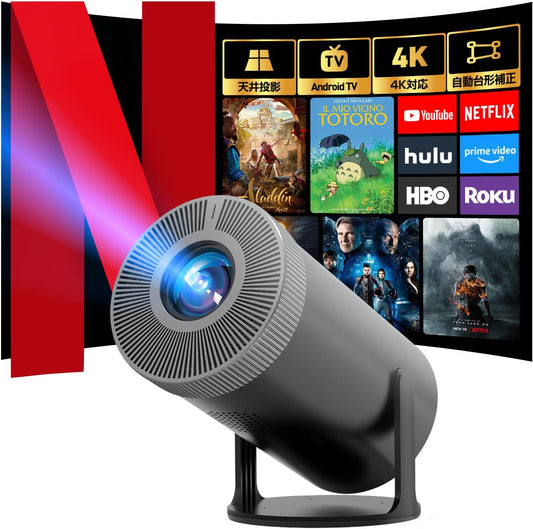
This article scientifically compares the "impact on eyes" of Aestiquo projectors (especially the popular P1 projector) and TVs, explaining which is actually gentler and how to use them correctly.
1. Causes of Eye Strain: Three Common Factors for Displays
Ophthalmologist's Opinion: "The main causes of eye strain from displays are 'brightness intensity,' 'contrast balance,' and 'screen flicker.'"
① Difference in Brightness Between Screen and Surroundings
A significant difference between screen brightness and room brightness can easily cause eye strain.
② Screen Flicker and Blue Light
"Flicker" can cause brain fatigue, and "blue light" can disrupt sleep rhythms.
③ Prolonged Staring and Reduced Blinking
During video viewing, the frequency of blinking decreases to about one-third of normal, leading to dry eyes.
2. Projector vs. TV: A Scientific Comparison Table
| Comparison Item | Projector (Aestiquo P1) | TV (55-inch 4K) | Degree of Eye Strain |
|---|---|---|---|
| Brightness (per unit area) | 100-200 cd/m² | 300-500 cd/m² | Projector is lower, less strain |
| Nature of Light | Indirect light reflected off wall or screen | Direct light from backlight | Indirect light causes less strain on retina |
| Blue Light Amount | Moderate (low reduction mode available) | Higher (low reduction mode available) | Depends on settings, but generally less for projectors |
| Field of View and Staring Range | Large screen allows eyes to move more easily | Medium screen tends to fixate eyes | Moving eyes is less tiring for eye muscles |
Key Point: Lower brightness per unit area and indirect light are major advantages of projectors. The Aestiquo P1, in particular, features an "Eye Protection Mode" in its menu that automatically adjusts brightness and reduces blue light.
3. Cases Where Projectors Are Disadvantageous: Three Precautions
① Using a Projector in a Bright Room
You need to maximize brightness, which can make your eyes tire more easily.
② Projecting a Large Screen in a Small Room
The appropriate viewing distance is 1.5-2.5 times the screen's diagonal (refer to Aestiquo's screen size calculation tool).
③ Using a Low-Quality Projector
Projectors with low resolution or blurry focus can easily cause eye strain.
4. Seven Rules for Eye-Friendly Use
-
Adjust ambient light
Minimize the difference between screen brightness and room brightness. -
Choose appropriate viewing distance and screen size
Projector: 1.5-2.5 times screen diagonal / TV: 3-5 times -
Use eye-friendly image settings
Utilize the P1's "Eye Protection Mode" or TV's "Eco Mode." -
Practice the 20-20-20 rule
View for 20 minutes → look 20 feet (approx. 6m) away for 20 seconds. -
Keep the screen clean
For lens cleaning methods, please contact support via the inquiry page. -
Maintain appropriate indoor humidity
Maintain indoor humidity at 40-60% to prevent dry eyes. -
Reduce blue light one hour before sleep
Utilize "warm color mode" or "night filter."
5. Special Precautions to Protect Children's Eyes
Recommended Maximum Screen Time for Children (Recommended by Japan Pediatric Society)
・Under 3 years old: 0 minutes / ・3-6 years old: Within 30 minutes per day / ・Elementary school students: Within 1 hour per day / ・Junior high school students and older: Within 2 hours per day
Refer to the FAQ page for information on setting up child mode.
6. Summary: The Best Approach is to Use According to the Situation
Conclusion: When properly configured and installed, projectors tend to be gentler on the eyes. However, in bright rooms or with low-quality models, TVs may be more suitable.
Aestiquo's P1 projector, with its various eye protection features, allows you to enjoy home viewing comfortably and safely.
7. Frequently Asked Questions (FAQ)
While the causes of myopia are diverse, projectors encourage more eye movement, which can offer some preventive effect.
Effectiveness varies by product. It is more important to utilize the device's built-in reduction features and manage viewing time appropriately.
Yes. The Aestiquo P1's "auto-focus function" and "keystone correction function" allow for easy adjustment to a clear screen.
OLEDs are generally considered gentler on the eyes than LCDs due to less flicker, but brightness should be reduced in dark rooms.
Aestiquo Official Support: Contact Form (Tuesday - Friday 10:00 - 18:00)・Product Information: Aestiquo P1 Projector