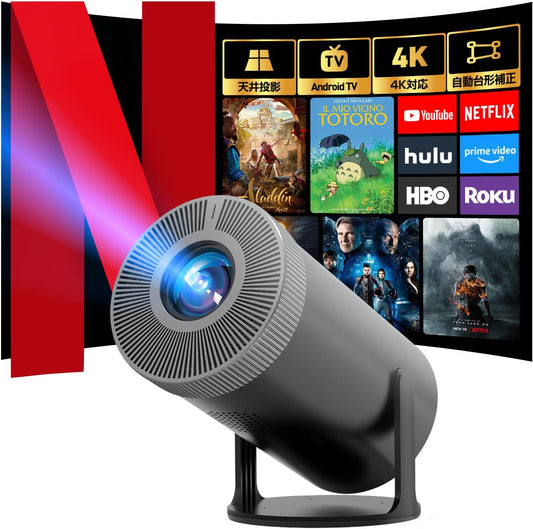
Are 4K screens bad for your eyes?
えい ほうShare
In recent years, 4K resolution projectors have become increasingly popular as home theaters. While ultra-high-definition images enhance the viewing experience of movies and TV dramas, concerns have arisen over whether 4K screens are harmful to the eyes. In fact, the impact of 4K images on the eyes is influenced not only by resolution, but also by multiple factors, including brightness, the amount of blue light, and the viewing environment. This article delves into the scientific relationship between 4K technology and eye health, the Aestiquo Q1 projector's low blue light design, and proper viewing habits.
The relationship between 4K video and eye strain
The feature of 4K video is that it has 3840 x 2160 pixels, which is about four times the resolution of Full HD (1920 x 1080 pixels). This allows for extremely clear reproduction of image details, making distant landscapes and text appear sharper.
The problem is the "blue light" emitted from the LED backlights found in many 4K displays. Blue light has a short wavelength and high energy among visible light sources, making it easy for it to reach the retina. Prolonged exposure to blue light can cause damage to retinal cells and disrupt sleep rhythms. Particular care is needed when viewing a bright screen in a dark room, as this dilates the pupils and allows more blue light to reach the retina.
Aestiquo Q1's low blue light design and safety standards
Product name: Aestiquo Q1 (4K compatible mini projector)
Core eye design:
- Low blue light filter : Compliant with the international standard IEC 62471, it selectively blocks blue light in the 400-450nm range, which is susceptible to damage to the retina.
- Optimal brightness setting : Screen brightness of 120cd/m² (lower than the 300-500cd/m² of a typical TV), a brightness that is gentle on the eyes and matches the large screen characteristics of the projector.
- Meets safety standards : Obtained the safest RG0 (harmless) class in the international standard for blue light risk, the RG classification.
According to a survey by JEITA (Japan Electronics and Information Technology Industries Association), RG0 class displays have not been found to pose any health risks from blue light under normal viewing conditions. This means that the Aestiquo Q1 is designed to minimize strain on the retina even when viewed for long periods of time.
How to properly view 4K images on a 4K projector
Even when using a low-blue light 4K projector like the Aestiquo Q1 , good viewing habits are important. Here are some tips to prevent eye strain:
Three points of viewing habits
-
Balancing viewing distance and screen size
The recommended viewing distance for a 4K projector is 1.5 to 2.5 times the diagonal length of the screen. For example, for a 100-inch (approximately 254 cm) screen, a distance of 3.8 to 6.4 m is appropriate. If the distance is too close, the eye's accommodation strain increases. - Adjust the brightness of your viewing environment . When viewing a bright screen in a dark room, your pupils dilate, increasing the effects of blue light. Use dim, indirect lighting in the room (e.g., wall lamps) to reduce the difference in brightness between the screen and the surrounding environment. You can also take advantage of the Aestiquo Q1 's automatic brightness adjustment function.
- Managing continuous viewing time <br>Practice the " 20-20-20 rule " recommended by the Ministry of Health, Labor and Welfare: After 20 minutes of viewing, look at something 6 meters away for 20 seconds. Ideally, total viewing time per day should be limited to 3 hours .
Key points to consider when choosing a 4K projector
When choosing a 4K projector, it is important to consider not only your eyes but also the following points:
Three criteria for selection
-
Check the resolution: True 4K or 4K compatible <br>True 4K: Native resolution 3840 x 2160 pixels (best image clarity).
4K compatible: Processes 4K signals with a full HD panel ( Aestiquo Q1 is equipped with 1080P native + 4K upscaling function). -
Light source type selection
LED light source: Long life ( Aestiquo Q1 is approximately 30,000 hours), low power consumption, low heat generation.
Laser light source: Excellent brightness and color reproduction, but tends to be expensive. -
Connectivity and Voice Features
For 4K 60fps video: HDMI 2.1 terminal confirmed to be installed.
Audio: Built-in speaker and Bluetooth compatibility ( Aestiquo Q1 is equipped with Bluetooth 5.3) allows connection to wireless devices.
Summary: 4K is easy on the eyes if used correctly
By using a projector with low blue light and brightness adjustment features like the Aestiquo Q1 and by following good viewing habits, you can safely enjoy the benefits of 4K.
Finally, if you experience persistent symptoms of eye strain (eye pain, blurred vision, stiff shoulders, etc.), be sure to consult an ophthalmologist. Regular eye examinations can help detect and address problems early. Having the right knowledge and habits will make your home theater experience with a 4K projector both more comfortable and safer.