Projector Care Manual: A Guide to Extending the Life of Aestiquo Projection Equipment
Introduction
Projectors are expensive investments and are designed for long-term use. Regular care and maintenance can extend the life of the equipment. In particular, Aestiquo's high-quality projection equipment can maintain its peak performance for a long time with proper maintenance. This article thoroughly explains how to care for your Aestiquo projector and introduces tips for regular maintenance and extending its life.
Daily care
1. Cleaning the exterior
Tools needed
- A soft, dry cloth ; a microfiber cloth is best.
- Compressed air : to blow away debris
- Mild detergent : Use as needed
Cleaning method
- Turn off the power and unplug it : Always do this for safety
- Wipe the exterior with a dry cloth to remove any light dust or dirt.
- Clean crevices with compressed air : Blow away debris from vents and crevices
- If the stain does not come off : Wipe with a cloth slightly dampened with neutral detergent.
2. Cleaning the filter
Why is cleaning the filter important?
- If the filter becomes clogged, ventilation will be reduced and the internal temperature will rise.
- Rising internal temperatures can shorten the lifespan of components.
- It may also cause a deterioration in image quality or malfunction.
Cleaning frequency
- General usage environment : Once a month
- In a dusty environment : Once every two weeks
- For use in commercial facilities : Once a week
Cleaning method
- Turn off the power and unplug it : Always do this for safety
- Remove the filter : Follow the instructions in the manual to remove it.
- Clean with compressed air : Lightly blow from the back of the filter
- When washing with water : Use a neutral detergent and dry completely before putting on
- Installing the filter : Install it securely
Regular maintenance
1. Lens maintenance
Tools needed
- Dedicated lens cleaner : Use one made for projectors
- Lens cloth : soft, dust-free cloth
Cleaning method
- Turn off the power and unplug it : Always do this for safety
- Lightly wet the lens cloth : Apply a little of the special cleaner
- Gently wipe the lens : Wipe in a circular motion
- Wipe with a dry area to remove all moisture
2. Cleaning the interior
Why is interior cleaning important?
- Dust that accumulates inside can cause parts to malfunction.
- In particular, dust around the light source can cause temperature rise.
Cleaning frequency
- General use : Once every six months
- In a dusty environment : Once every three months
Cleaning method
- Turn off the power and unplug it : Always do this for safety
- Open the case : Follow the instructions in the manual
- Clean with compressed air : Blow away dust from inside
- Particular attention should be paid to the areas around the light source, the fan, and the heat sink.
3. Light source management
Light source life
- LED light source : about 20,000-30,000 hours
- Laser light source : Approximately 25,000-30,000 hours
Tips for extending the life of your light source
- Proper power management : Turn off the power when not in use for an extended period of time
- Brightness settings : Do not set the brightness higher than necessary
- Power cycling : Avoid cycling power frequently
- Temperature control : Do not block vents
Optimizing the installation environment
1. Temperature control
Recommended ambient temperature
- Operating temperature : 5°C-35°C
- Storage temperature : -20°C-60°C
Temperature control points
- Ventilation space : Ensure there is at least 10cm of space around the unit
- Ensure ventilation : Do not block the ventilation openings
- Well-ventilated area : Install in a well-ventilated area
- Avoid direct sunlight : Do not place in direct sunlight.
2. Humidity control
Recommended Humidity
- Operating humidity : 20%-80% (non-condensing)
- Storage humidity : 10%-90% (no condensation)
Humidity control points
- Beware of condensation : Beware of sudden temperature changes
- Use a dehumidifier : Use a dehumidifier in humid environments
- Regular ventilation : Ventilate regularly
3. Vibration and shock prevention
Effects of vibration and shock
- Damage to internal components
- Lens misalignment
- Light source failure
Prevention measures
- Use a stable stand : Place on a stable stand
- Caution when moving : Before moving, turn off the power and allow the unit to cool down sufficiently.
- Check packaging : Pack properly when transporting
troubleshooting
1. Deterioration of image quality
Causes and solutions
- Dirty lens : Clean the lens
- Clogged filter : Clean the filter
- Light source degradation : Replace the light source (if necessary)
2. Overheating Error
Causes and solutions
- Clogged vents : Clean the vents
- Clogged filter : Clean the filter
- Rising ambient temperature : Change the installation location to one with better ventilation.
3. The power won't turn on
Causes and solutions
- Power cable connection : Check the connection
- Power outlet : Check that the power outlet is working properly
- Overheat protection : Allow to cool and try again
Tips for long-term storage
1. Preparation before storage
- Allow to cool completely : Allow to cool completely after use
- Cleaning : Clean the exterior and filter
- Unplug the power cord : Unplug the power cord completely
- Packaging : Packed in original packaging
2. Storage environment
- Temperature and humidity : Store in an appropriate temperature and humidity area.
- Vibration and shock : Store in a place free from vibration and shock.
- Direct sunlight : Store out of direct sunlight
- Regular checks : If stored for a long period of time, check regularly.
summary
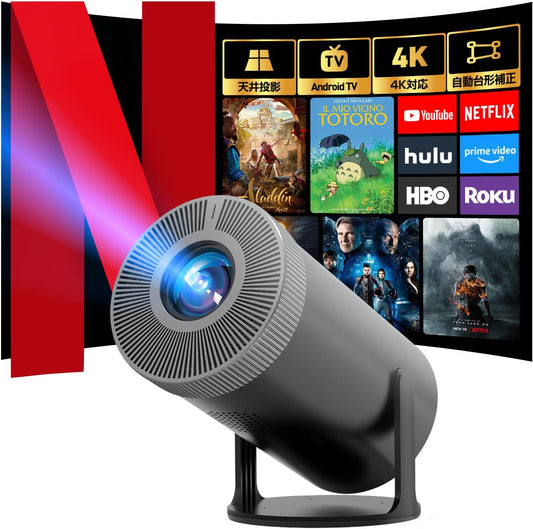
With proper care and maintenance, Aestiquo projectors, such as the Aestiquo P1 , can maintain their peak performance for a long time. Routine cleaning, regular maintenance, and optimizing the installation environment are just a few of the ways to extend the life of your equipment.
In particular, cleaning the filter, managing the light source, and controlling the temperature and humidity have a significant impact on the lifespan of the equipment. By paying attention to these points and performing maintenance, you can enjoy Aestiquo's high-quality projection equipment for a long time.
Regular maintenance is important not only to prevent equipment breakdowns but also to maintain optimal image quality and performance. Please follow the guide in this article to take care of your Aestiquo projector.
Related articles
- 4K vs. 1080p Projectors : What's the Difference?
- How long does a projector last? - Projector lifespan and how to extend it
- How to Choose a Home Projector - Recommended Models by Budget and the Benefits of Aestiquo