What's the difference between expensive and cheap projectors? A thorough comparison based on five key points
えい ほうWhen buying a projector, why is there such a large price difference between "cheap models in the 10,000 yen range" and "high-end models over 50,000 yen"? A higher price doesn't always mean better quality, and sometimes a cheaper model can be perfectly adequate if it suits your needs.
This article will thoroughly compare the "core differences" between expensive and cheap projectors across five points (picture quality, brightness, durability, features, and sound quality), and explain which model is suitable for which scenario. Additionally, using Aestiquo's popular projector (Aestiquo P1) as an example, we will introduce how to choose a model that offers a "good balance of price and performance."
1. Price Range Classification for Expensive and Cheap Projectors
First, let's define the price ranges for "expensive projectors" and "cheap projectors." Generally, home projectors are categorized as follows:
- Price Range: 10,000 ~ 30,000 yen
- Target Users: First-time projector users, those on a limited budget, those using it for simple purposes (children's educational videos, basic movie viewing)
- Key Features: 720P resolution (some 1080P), 300-500 ANSI lumens brightness, basic connectivity only, LED lifespan 10,000-20,000 hours
- Price Range: 50,000 ~ 150,000 yen (some premium models over 200,000 yen also exist)
- Target Users: Those who want to build a home theater, those who prioritize high picture quality, those who want to use it long-term, those who want to utilize diverse functions
- Key Features: 1080P~4K resolution, 600-2000 ANSI lumens brightness, multi-functional such as wireless connectivity, keystone correction, low latency mode, LED lifespan 25,000-50,000 hours
Tip: Many "mid-range" projectors priced between 30,000 and 50,000 yen also exist. The Aestiquo P1 is one popular model in this mid-range.
2. Five Core Differences Between Expensive and Cheap Projectors
The price difference between expensive and cheap projectors mainly stems from five factors: "picture quality," "brightness," "durability," "features," and "sound quality."
① Picture Quality: Resolution and Color Reproduction are Decidedly Different
| Comparison Item | Cheap Projectors (10,000-30,000 yen) | Expensive Projectors (50,000-150,000 yen) |
|---|---|---|
| Resolution | Mainly 720P. Some models claim "simulated 1080P," but there is a difference in picture quality compared to true 1080P. | 1080P as standard, with 4K support in high-end models. Reproduces text edges and fine details of images clearly. |
| Color Reproduction | Narrow color gamut (sRGB 60-80%), often with color bias. | Achieves a wide color gamut (sRGB 90-100%, DCI-P3 support). Accurately reproduces the original colors of movies and photos. |
| Contrast Ratio | Often low contrast ratio (1000:1-2000:1), resulting in inadequate black representation in dark scenes. | Achieves high contrast ratio (3000:1-10000:1). Provides immersive images. |
Note: "Simulated 1080P" on cheap projectors is different from true 1080P. It displays 720P images scaled up by software, which can lead to image degradation.
② Brightness: Differences in ANSI Lumens and Actual Usage Scenarios
- ANSI Lumens: 300-500 lumens are common.
- Usable Location: Can only be used in dark rooms.
- Light Source Type: Low-quality LED light source. Brightness tends to decrease with prolonged use.
- ANSI Lumens: 600-2000 lumens are common. Small difference between measured and advertised values.
- Usable Location: Can be used in dim rooms, and even in a daytime living room with blackout curtains.
- Light Source Type: High-quality LED light source or laser light source. Less light degradation, maintains brightness even with prolonged use.
Tip: For general home use (evening living room, 80-100 inch screen), a brightness of 600-800 ANSI lumens is optimal. The Aestiquo P1 achieves 700 ANSI lumens and has an energy-saving design.
③ Durability: Differences in Component Quality and Lifespan
| Comparison Item | Cheap Projectors (10,000-30,000 yen) | Expensive Projectors (50,000-150,000 yen) |
|---|---|---|
| Light Source Lifespan | 10,000-20,000 hours. Light source often needs replacement in 2-3 years. | 25,000-50,000 hours. Light source does not need replacement for 5-10 years. |
| Heat Dissipation Design | Low heat dissipation efficiency, prone to overheating with prolonged use. Fan noise tends to be louder. | Equipped with multiple large-diameter, quiet fans. Low fan noise (25-30dB), allowing for use in quiet environments. |
| Power Unit | Uses low-quality power components, vulnerable to voltage fluctuations. Prone to failure, with high repair costs. | Uses high-quality power components. Longer product warranty period (generally 1-3 years). |
④ Features: Differences in Ease of Use and Versatility
- Keystone Correction: Simple manual keystone correction (vertical only).
- Connectivity: Basic interfaces only, such as HDMI x1, USB x1. No support for WiFi or Bluetooth.
- Special Features: No low latency mode, auto focus, etc.
- Keystone Correction: Equipped with automatic vertical/horizontal keystone correction (±40 degrees or more). High degree of installation flexibility.
- Connectivity: HDMI x2, WiFi (5GHz compatible), Bluetooth 5.0 as standard. Can cast from smartphones.
- Special Features: Equipped with various features such as low latency mode (under 20ms), auto focus, blue light reduction mode.
⑤ Sound Quality: Differences in Built-in Speaker Quality and Output
| Comparison Item | Cheap Projectors (10,000-30,000 yen) | Expensive Projectors (50,000-150,000 yen) |
|---|---|---|
| Speaker Output | Low output of 1W x 2ch ~ 2W x 2ch. Low volume, sound often distorts when turned up to maximum. | High output of 5W x 2ch ~ 10W x 2ch. Provides clear sound even in large rooms. |
| Sound Quality Adjustment Function | Basically no sound quality adjustment function. | Equipped with equalizer (EQ), bass booster, sound field modes. Some high-end models support DTS and Dolby Audio. |
| Connection to External Audio Equipment | AUX OUT port only. No support for Bluetooth or optical digital output. | Equipped with various connection methods such as Bluetooth 5.0, AUX OUT, optical digital output, HDMI ARC. |
3. Which Projector Should You Choose for Which Scenario?
Key selection points: By clarifying the four points of "purpose of use," "brightness of the location of use," "budget," and "whether to use long-term," you can choose the optimal projector.
① Scenarios Where Cheap Projectors Are Suitable
-
When watching children's educational videos
A cheap projector with 720P resolution and 300-500 ANSI lumens is sufficient. -
When using temporarily for travel or business trips
A small and lightweight cheap projector is suitable. -
When you want to try out how to use a projector (for beginners)
It is recommended to first learn how to operate it with a cheap model, then upgrade as needed.
② Scenarios Where Expensive Projectors Are Suitable
-
When building a home theater and wanting to watch high-quality movies
A 1080P Full HD compatible model like the Aestiquo P1 provides an immersive home theater experience. -
When using in a bright room (daytime living room)
A projector with high brightness (600 ANSI lumens or more) is required. -
When playing games for long periods
An expensive projector with a low latency mode (under 20ms) is suitable. -
When you want to use it long-term (3 years or more)
Uses high-quality components, so it has a long lifespan and is less prone to breakdown.
4. Aestiquo P1: A Mid-Range Option with a Good Balance of Price and Performance

💡 Best Cost-Performance Model
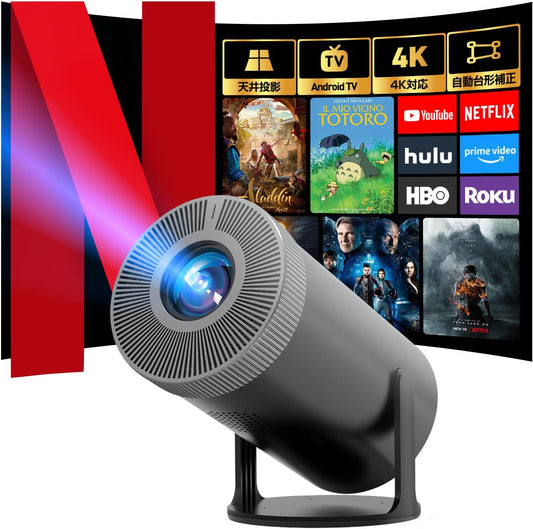
Aestiquo P1 ProjectorAndroid TV Compatible, 4K Supported, 270° Rotation
- 1080P Full HD, sRGB 92%, 3000:1 Contrast
- 700 ANSI Lumens, LED Lifespan 30,000 Hours
- Auto Keystone Correction, Low Latency Mode, WiFi 5/BT 5.0
Tip: Among mid-range projectors, the Aestiquo P1 particularly excels in "balancing brightness and power saving." If you have any questions, please feel free to contact us via our contact page.
5. Projector Buying Checklist
| Check Item | Confirmation Point | Cheap Projectors | Expensive Projectors |
|---|---|---|---|
| Purpose of Use | Whether the main use is movie viewing, gaming, education, or presentations | Suitable for simple movie viewing, education | Suitable for high-quality movie viewing, gaming |
| Brightness of Location of Use | Whether it will be used in a dark room, dim room, or bright room | Limited to use in dark rooms | Can be used in dim rooms, bright rooms |
| Required Resolution | Is 720P sufficient, or is 1080P or higher required? | 720P is common (some simulated 1080P) | 1080P~4K is common |
| Durability | How long do you want to use it: 1-2 years, 3-5 years, or 5+ years? | Suitable for short-term use of 1-2 years | Suitable for long-term use of 3-5+ years |
| Budget | What is the purchase budget? | Fits a budget of 10,000-30,000 yen | Requires a budget of 50,000 yen or more |
6. Summary
Summary of Core Selection Points
1. When choosing a cheap projector: For children's educational videos, temporary use, beginner trial, or a budget limit of 10,000-30,000 yen.
2. When choosing an expensive projector: For home theater construction, use in bright rooms, gaming, or long-term use of 3+ years.
3. When choosing a balanced mid-range model (like Aestiquo P1): For general home entertainment, use in dim rooms, or when prioritizing a balance between price and performance.
Finally, for the Aestiquo P1, you can receive detailed product information and advice on how to use it by contacting the contact page.
7. Frequently Asked Questions (FAQ)
- Q: Cheap projectors also claim 1080P resolution, but is it different from true 1080P?
- A: Yes, in many cases, it is called "simulated 1080P," and there is a difference in picture quality compared to true 1080P. It is important to check the "native resolution" when purchasing.
- Q: Can the mid-range Aestiquo P1 be used in a bright room?
- A: The Aestiquo P1 achieves a brightness of 700 ANSI lumens, so a sufficiently clear screen can be obtained in a daytime living room with blackout curtains (a dim environment).
- Q: What is the difference between "ANSI lumens" and "lumens" for projectors?
- A: "ANSI lumens" is a value measured by an international standard, and "lumens" is a value indicating the brightness of the light source itself. When comparing projector brightness, you should use the "ANSI lumens" value as the standard.
For detailed specifications or questions regarding the purchase of the Aestiquo P1 projector, please feel free to contact us via the contact page. Product Information: Aestiquo P1 Projector